Switching to the Light mode on the Galaxy Z Fold 8 Ultra enhances battery life significantly without compromising performance.
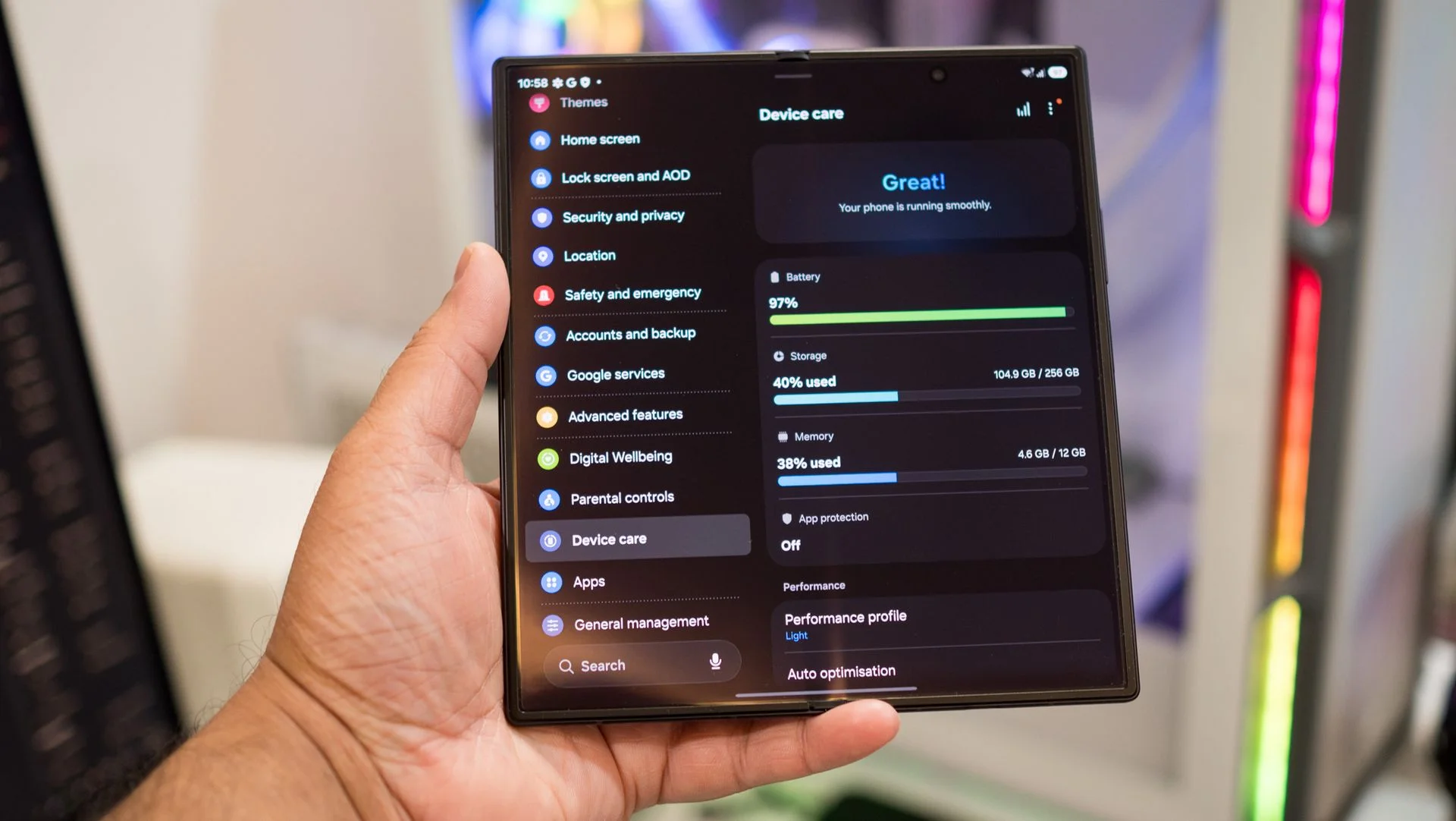
The Galaxy Z Fold 8 Ultra boasts a 5,000mAh battery that already extends usage compared to earlier models. However, further enhancing its battery performance is as simple as toggling a setting within One UI. By switching to the Light mode, users can see a notable increase in battery longevity without sacrificing daily performance. This kind of adjustment speaks to a larger trend in tech: manufacturers are increasingly focusing on user-friendly features that can provide significant benefits without requiring deep technical knowledge from users.
Understanding Performance Profiles
Samsung phones come equipped with a Standard profile by default. This is the performance setting that balances functionality and battery consumption under typical usage scenarios. Yet the Light mode is explicitly designed to optimize for battery efficiency and thermal management, a necessary feature as mobile applications become more resource-intensive. Accessible through the Device care section, switching between these modes can easily tailor your device's performance to your needs. Often, users overlook these settings, assuming their device’s default settings are the best choice.
The Light profile stands apart from the Energy Saver mode, which is often misunderstood. While the latter may throttle overall performance to conserve power, Light mode maintains a smooth user experience, keeping those high-quality 120Hz refresh rates intact. By primarily managing power consumption through lower processor clock frequencies, it provides an optimal balance for high-end devices like the Galaxy Z Fold 8, which are equipped with ample processing power. The irony is that managing a device’s processing capabilities can often lead to improved performance in mundane tasks without the user even noticing it.
Real-World Battery Usage Experience
After enabling the Light profile, my daily usage improved by almost an additional hour—without seeing any lag during multitasking. This ability to extend battery life while maintaining functionality is significant, especially for power users who rely on their smartphones for both work and leisure. This mode activates automatically during demanding situations; for instance, when gaming, the device switches to Game Booster, ensuring optimal performance without compromising on speed or quality for gaming activities. You're not just getting battery savings; you're getting a device that can intelligently adapt.
Using the Light profile makes a tangible difference, particularly outdoors. Prolonged use in varied thermal conditions can often lead to performance throttling, but the Galaxy Z Fold 8 excels at balancing thermal levels. I found that I could comfortably last through an entire day, from morning meetings to evening gaming sessions, without needing a recharge. That’s not just a minor improvement; it's a significant boost to productivity and overall user experience. (And this is the part most people overlook: users aren’t just passive consumers; they actively shape how their devices perform.)
How to Activate the Light Profile
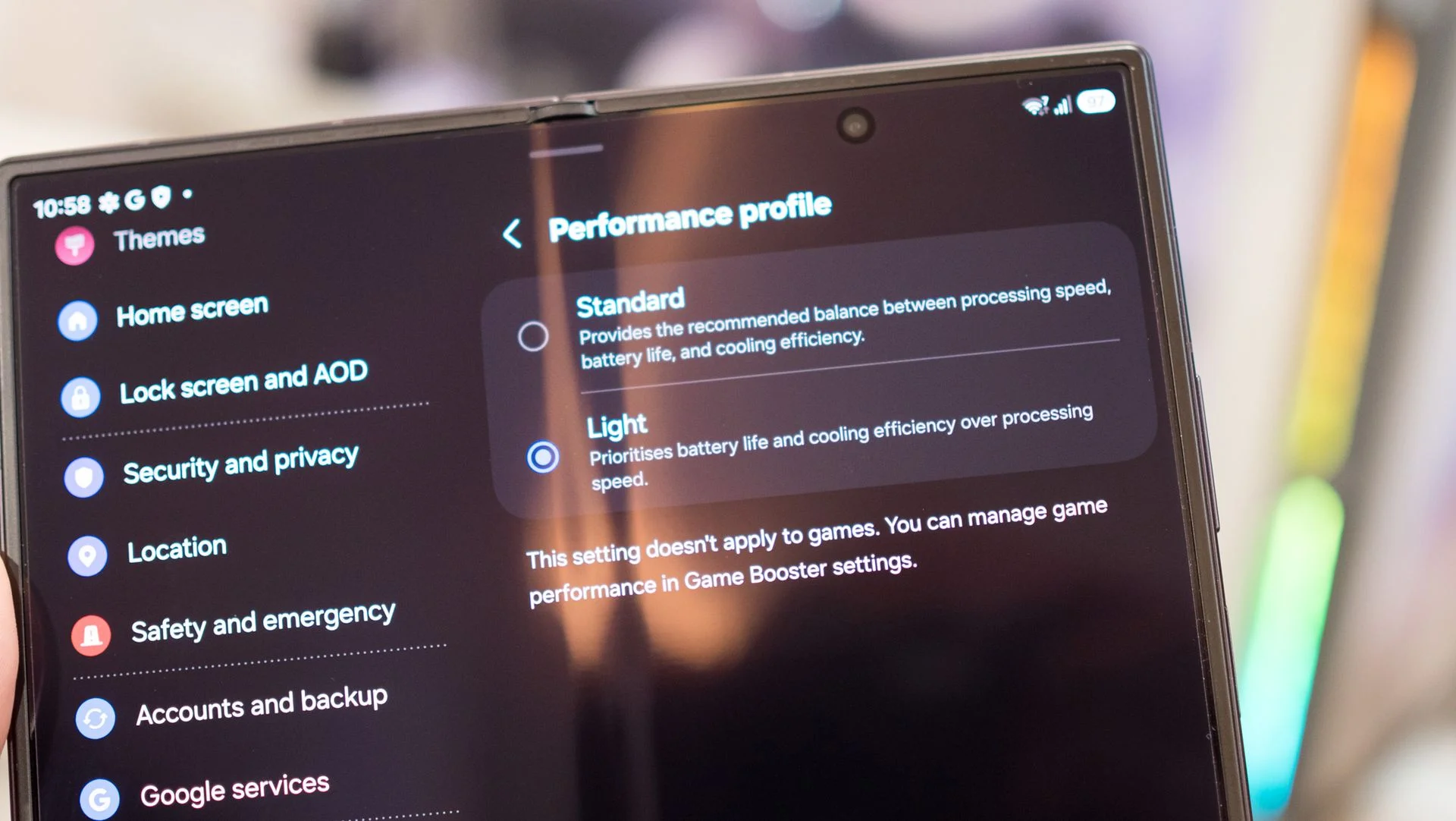
Enabling the Light profile is straightforward. Just follow these steps:
- Open the Settings app.
- Find Device care.
- Select Performance profile.
- Choose Light.
This feature is available across all Samsung devices, so even older Galaxy phones can benefit from this simple adjustment to extend battery life. You won’t be left in the dust if you’re using an older model — a nice touch that showcases Samsung’s commitment to user experience across its product range. This is more significant than it looks, as it promotes a culture of longevity for devices that might otherwise be considered obsolete.
Implications and Future Outlook
These battery performance enhancements reflect broader trends in the smartphone industry where user-centric features are increasingly prioritized. As demands for mobile devices grow, so does the need for efficient power management. If you're working in this space, understanding how users interact with settings like Light mode can influence design decisions and marketing strategies. Future smartphones may see more emphasis placed on customizable performance profiles that adapt in real-time to usage scenarios. That’s the direction we’re heading, and it’s tech that minimizes user frustration while maximizing device longevity.
One could argue that while manufacturers focus on hardware upgrades, software optimizations like these are the unsung heroes that could reshape user expectations. This trend also highlights the importance of user education around features that are all too often ignored. The more users know, the better they can optimize their experience. As tech evolves, so should our understanding of how to navigate it.

Discussion
Sign in to join the discussion.